
Most people cannot schedule a message in Discord's own apps yet: Discord is testing scheduled messages with a small, random group of users, and you cannot sign up. Until it reaches you, you can schedule a message to any channel where you can manage webhooks, without adding a bot to your server.
Can you schedule messages in Discord?
Not for most accounts. Discord lists scheduled messages as an active beta for a small, randomly chosen group of users, and says its support team cannot add anyone to a beta (Discord's Beta Programs FAQ, checked 20 November 2026). Discord also warns that a beta can change a lot or be discontinued if it does not move toward a wider release.
If your Discord shows a beta label on a scheduling option, you are in the test, so use it. If it does not, nothing you do will switch it on. Do not mix it up with Scheduled Events, a separate Discord feature that announces an event, not a message.
What are your options until then?
Four: Discord's own beta, a scheduler bot, your own script that calls a webhook, or a scheduling tool that posts through a webhook. Only the last two need neither the beta nor a bot.
| Option | Needs a bot in your server? | The message comes from | Best for |
|---|---|---|---|
| Discord's scheduled messages (beta) | No | You | The few accounts that have the beta |
| A scheduler bot | Yes: you invite it and grant permissions | The bot | Servers that already run bots and want commands inside Discord |
| Your own script that calls a webhook on a timer | No | The webhook | Developers who are happy to run and watch a job |
| A scheduling tool that posts through a webhook, such as Postrooster | No | The webhook, under the name the tool sets (Postrooster uses "Postrooster") | Planned announcements, or one post that also goes to other platforms |
A webhook is a URL that lets something post into one channel. Discord's developer documentation describes webhooks as a low-effort way to post messages that needs no bot user and no authentication (Discord developer docs). A webhook is for posting. Reading replies, answering commands and moderating still take a bot.
How do you schedule a Discord message with Postrooster?
Connect the channel once, write the message, check the pings and pick a time.
- Connect the channel. In Postrooster choose Connect account, then Discord. You log in on Discord's own page and pick a server and a channel. Discord only lists channels where you hold the Manage Webhooks permission. Give the connection a name you will recognise.
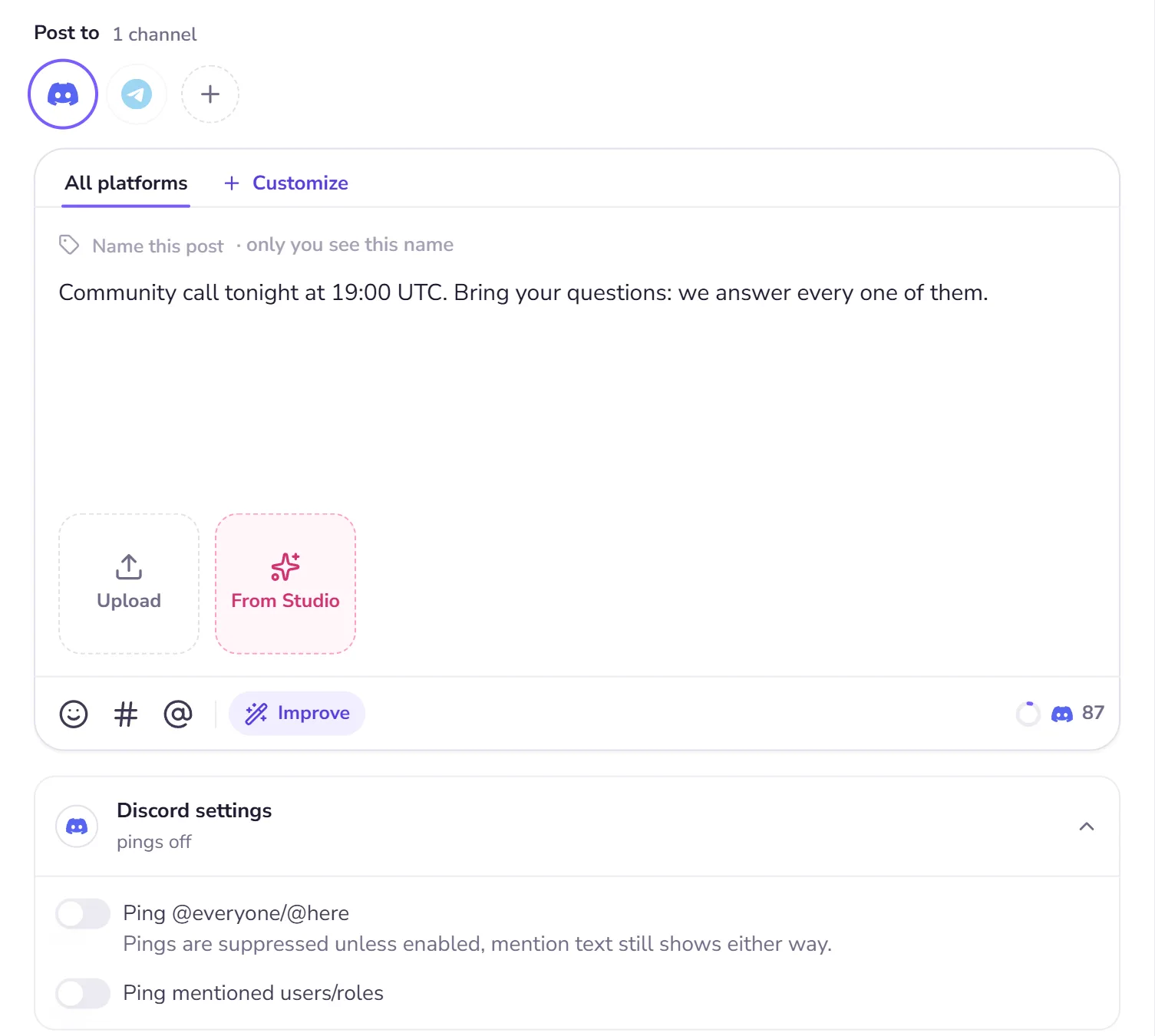
- Write the message once. Pick the Discord channel in the composer and write. The counter shows how much of Discord's 2,000 characters you used, and Discord's own formatting works in the text. To give Discord different wording than your other platforms, open Customize. You can attach up to 10 images or videos, and Postrooster stops a file that is over its size limit before you can schedule.
- Check the pings. Open Discord settings under the message. Both ping switches start off.
- Pick the time. Choose Schedule. Pick a quick option such as tomorrow morning, or a date and a time. The picker shows the time zone it uses.
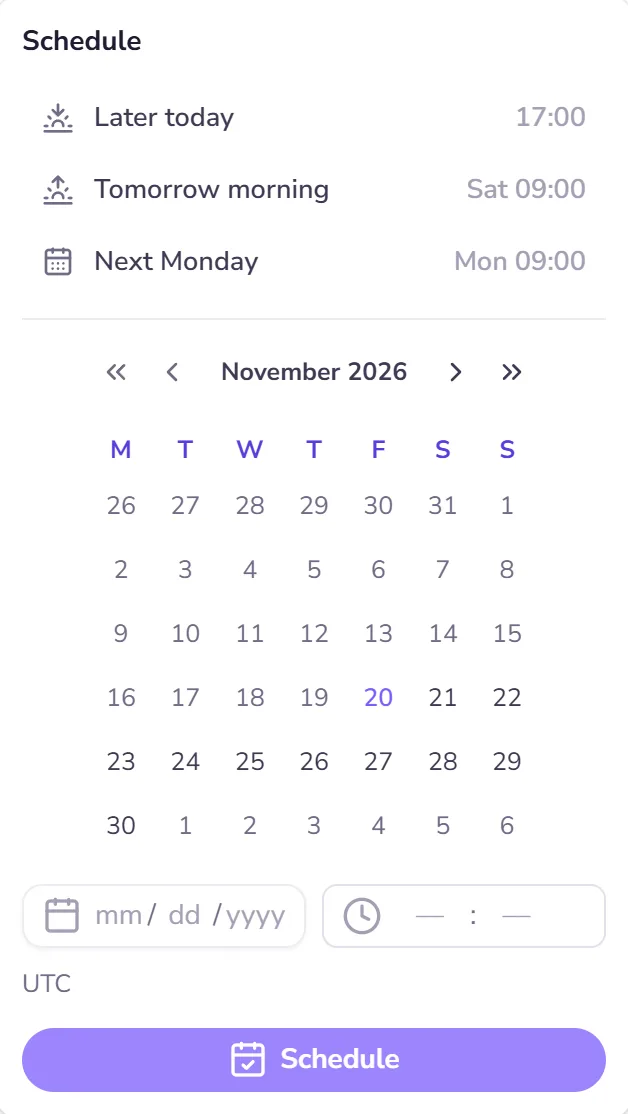
At that time the message appears in the channel, posted by Postrooster. Until then the post waits on your board and your calendar, where you can move it to another day.
What are Discord's limits for a message?
A Discord message holds 2,000 characters and a file 20 MiB by default. These are the limits that matter for a scheduled post, read from Discord's own pages on 20 November 2026:
| Limit | Value | Source |
|---|---|---|
| Message text | 2,000 characters | Discord developer docs, webhooks |
| File size | 20 MiB per file by default (the free upload limit in the app rose from 10 MB to 20 MB in August 2026), more with Nitro or a server with a higher Boost tier | Discord API reference and File Attachments FAQ |
| Webhook into a forum or media channel | Needs a thread ID or a thread name | Discord developer docs, webhooks |
Postrooster applies its own, lower file limit: 10 MB per file as of 20 November 2026 (see the Discord page). It also sends no thread ID or thread name, so pick a text or announcement channel, not a forum channel. Discord has changed its file limits before and may do it again, so check the date above before you rely on a number.
How do you stop a scheduled message from pinging everyone?
Leave the ping switches off. Postrooster tells Discord not to ping anyone unless you turn on @everyone and @here, or pings for the users and roles you mention, for that post. The mention text still shows in the message either way.
Discord's documentation says that webhook messages ping mentioned users by default and that the allowed_mentions field is what decides who gets a notification (Discord developer docs, messages). Postrooster sends an empty list unless you switch a ping on, so even a mentioned user stays quiet.
Why did my scheduled Discord message not go out?
Three things can stop a scheduled message:
- The webhook was deleted, or the channel was removed. Deleting the webhook in the server settings kills the connection for good. Connect the channel again and pick the same channel.
- The message or a file was too big. A message over 2,000 characters and a file over Postrooster's limit are caught before you can schedule, so this should not happen at send time.
- A hiccup on Discord's side. Postrooster retries automatically, and emails you if the message still fails.
Can you post to Discord and other platforms at once?
Yes. Pick your Discord channel and another platform, for example Telegram, in the same composer: each one gets the post in its own format, and Customize lets you word each one differently. The Discord page lists what you can post to a channel, the Telegram page does the same for Telegram, and all platforms are one click away.