You can make a talking-to-camera UGC video without a creator: write a 15-second script, give an AI presenter a look, a voice and a place, let a video model make picture and sound together, check the take and post it with the platform's AI label switched on. What you must not do is let that presenter pose as a customer: the US Federal Trade Commission (FTC) rule on fake reviews and testimonials covers testimonials from people who do not exist, and TikTok, YouTube and Instagram each ask for a label on realistic AI video. A 15-second clip holds only about 30 to 40 spoken words at a natural pace, so the script and the checking are the real work.
What is a UGC video, and what changes when an AI makes it?
UGC stands for user-generated content: a video that looks like an ordinary person filmed it on their phone and is talking straight to you. In marketing the word also names a job. A UGC creator is paid to film a script for a brand, and the brand posts or advertises the result.
An AI presenter replaces the person on camera. It does not replace the script, the plan or the rules. Two terms: a "model" is the AI program that makes the video, and a "take" is one attempt, of which you usually need two or three. Our running example is Nova Notes, a fictional note-taking app that wants one 15-second tip video for TikTok and YouTube.
| Real creator | AI presenter | |
|---|---|---|
| Who speaks | A real person | A fictional person made by AI |
| What it can honestly say | Their own experience, and a review if they really used the product | A tip, an explanation, facts you can prove. Never "I used it" |
| Changing a line | Ask for a reshoot | Edit the script and make another take |
| What you owe viewers | Disclosure of any payment or free product | The platform's AI label, and no pretending the presenter is a customer |
When does an AI presenter fit, and when should you hire a person?
It fits when the video explains something and nobody needs to have used the product. It does not fit when the value is a real person's experience. An AI presenter is a host, not a witness. This is our judgment, not a platform rule:
- Good fits: a tip or a how-to, the answer to a question customers keep asking, an explainer built from facts you can prove, and a cheap test of three hooks before you pay for a shoot.
- Bad fits: a review, an unboxing, a before and after, a testimonial or any claim of personal use or results, advice on health, money or law from a face that looks like an expert, and any face meant to look like a real customer or employee.
We found no primary source that measures whether AI presenters beat real creators. The articles that claim it come from companies that sell the tools, so test it on your own account. After this section you can tell a tip video from a testimonial video, and only the first is for an AI presenter.
What must you disclose? (The FTC Rules and Each Platform's AI Label)
Everything below was read on 22 November 2026 on each regulator's or platform's own pages, and where a page says nothing, we say so. Switch on the AI label on every platform that offers one, say in plain words that the presenter is AI, and never present the presenter as a real customer. This is not legal advice and gives no verdict on your case: for that, ask a lawyer.
What does the FTC say?
The FTC is the US consumer regulator. We cite it because it has the clearest written rule on fake testimonials that we found, and the platform labels below apply wherever you post. Its rule on consumer reviews and testimonials (16 CFR Part 465) has been in force since 21 October 2024. It makes it an unfair or deceptive practice for a business to write, create or sell a consumer review, consumer testimonial or celebrity testimonial that materially misrepresents that the reviewer exists, that they used the product, or what their experience was (eCFR, Part 465). The FTC's announcement of 14 August 2024 gave "AI-generated fake reviews" and reviews by "someone who does not exist" as examples (FTC press release).
The rule's text does not mention AI avatars or virtual influencers; it targets testimonials that misrepresent that the testimonialist exists or used the product. The Endorsement Guides add that an obviously fictional dramatization is not an endorsement (eCFR, 16 CFR 255.0, Example 2).
Our reading, not legal advice: a presenter who explains a tip is one thing, and one who says "I used it for a month and it fixed everything" is another. The second is a testimonial from someone who does not exist, the case the FTC names.
What do TikTok, YouTube and Instagram ask?
All three ask you to label realistic AI video, and none of their pages says the label cuts your reach.
| Platform | What its page says | Where you switch it on |
|---|---|---|
| TikTok | Creators must label AI-generated content with realistic images, audio or video, and unlabeled content can be removed, restricted or labeled. The label does not affect distribution under the guidelines. It bans AI content showing the likeness of under-18s, and of adult private figures used without permission (TikTok Support, no date shown; Community Guidelines, released 25 August 2026, in force from 24 September 2026) | In the TikTok app under More options. In Postrooster's composer: "This video is AI-generated" |
| YouTube | Disclose realistic content that was altered or made synthetic when you upload. AI for scripts or ideas needs no disclosure. Disclosing does not limit audience or monetization, but repeated non-disclosure can bring a label, removal or suspension from the Partner Program, the program that pays creators (YouTube Help, no date shown) | In YouTube Studio during upload. In Postrooster's composer: "Contains realistic AI-generated or altered content" |
| Meta requires a label on photorealistic video or realistic-sounding audio generated or altered digitally, including with AI, and lists a reel (Instagram's short video) with a realistic AI voiceover as an example. It warns of penalties and may label content itself (Instagram Help, no date shown) | The "Add AI label" switch when you create a reel, in the Instagram app. Postrooster's composer has no AI-label field for Instagram |
Three more points:
- Whole profiles. Instagram's creator blog of 31 August 2026 says profiles that feature an AI-generated person and carry no label may see their reach limited, and that creators add the label by editing their profile (Instagram for Creators). If one AI presenter becomes the face of an account, label the account too.
- Paid ads. Instagram's page says labeling AI content is different for ads. Read each platform's ad policy before you boost this video; we did not read them.
- The EU. The European Commission says the AI Act's transparency duties (Article 50) apply from 2 August 2026, with a transitional period to 2 December 2026 for systems already on the market, and that the "deployers" who use an AI system label deepfakes (European Commission). Whether a given presenter counts as a deepfake is for the Commission's guidelines and your lawyer.
How do you make an AI UGC video, step by step?
Ten steps for TikTok and YouTube, roughly an hour the first time (our estimate). Steps 2 to 4 use the prompts in the next section.
- Pick one tip, one viewer and the facts you can prove. Ten minutes. Nova Notes picks the tip "tag every note the moment you write it", the viewer "someone whose notes app is a mess" and one provable fact, that the app lists untagged notes (invented for this example). The presenter explains and never says "I tried" or "my customers". Done when the tip fits in a sentence without "and".
- Write three scripts with Prompt 1. Ten minutes. A "hook" is the opening line that keeps people watching. Fifteen seconds holds about 30 to 42 spoken words at 2 to 2.8 words a second (our rule of thumb). Read each script aloud with a timer and keep the one that fits. Done when one reads in 15 seconds.
- Make or choose the presenter. Ten minutes. Describe a fictional adult with Prompt 2 and make three portraits, or pick a ready-made creator, and keep one as the "reference image", the picture the model copies the face from. Nova Notes picks a woman in her late twenties with thin round glasses and a grey sweater. Never use a real person's face without permission, or a celebrity's.
- Write the scene prompt with Prompt 3. Five minutes. Fill in its six lines and paste your script between the quotes. Nova Notes sets the place to "a bright kitchen with a tall plant". Done when it reads like a shot a camera operator could follow.
- Pick a model and the settings. Five minutes. Choose 9:16 portrait, the usual shape for TikTok, Reels and Shorts, 15 seconds or less and sound on, and add the reference image if the model takes one. None of the four makers lists Dutch as a speech language, so test one short sentence in your language before the whole video. Done when the length fits the model's longest clip (table below).
- Make two or three takes. Change one thing between takes: the line, the place or the model, not all three. Done when one take passes the checklist.
- Review the take, then run Prompt 5 on the script. Ten minutes. Go through the checklist below and let an assistant do a first pass over the claims. Done when every box is ticked.
- Write the caption and the disclosure line. Five minutes. Prompt 4 makes the caption plus one plain line saying the presenter is AI. Done when the caption says it.
- Build the post in Postrooster. Ten minutes. Open the composer, pick TikTok and YouTube under "Post to", add the video with "Upload" and write the main caption. Then press "Customize" and give each platform its own caption: a customized tab does not follow later edits to the main one, so write the main caption first. Done when each platform's tab holds its own text.
- Set the labels and the time. In the "TikTok settings" choose who can watch, tick "This video is AI-generated" and, if the video promotes your business, turn on "Disclose commercial content". In the "YouTube settings" tick "Contains realistic AI-generated or altered content". Press "Schedule", pick "Tomorrow morning" or a day and time in the calendar, then confirm with the button that reads "Schedule for" and your time. The arrow next to "Schedule" offers the same quick picks in one click, plus "Pick a date and time".
Which prompts should you copy? (Five Prompts With Placeholders)
Replace everything in [SQUARE BRACKETS]. Each prompt says what it makes, how to adjust it and which tools can run it. The examples use Nova Notes.
Prompt 1: three scripts for one tip
Makes three 15-second scripts with a hook, timed beats and a short on-screen caption.
You are a short-form video scriptwriter for [BRAND], [ONE SENTENCE ABOUT WHAT IT IS AND WHO IT IS FOR].

Write 3 different scripts for a talking-to-camera video of exactly [SECONDS] seconds, spoken by a fictional AI presenter. The video teaches one tip.

Tip: [THE ONE THING THE VIEWER SHOULD TAKE AWAY]
Viewer: [WHO WATCHES, AND THEIR PROBLEM]
Tone: [for example friendly, direct, a little dry]
Language: [LANGUAGE]

Rules:
- Spoken words only, between [MINIMUM WORDS] and [MAXIMUM WORDS] words.
- The first sentence is the hook: the viewer's problem or a surprising fact, in 8 words or fewer.
- One idea, one tip.
- The presenter must not claim personal experience or results ("I tried", "I use", "my customers"). It explains, like a host.
- No numbers, statistics, prices or medical, legal or financial claims, unless I list them under "Facts you may use".
- No stage directions, emojis or hashtags in the spoken text.
- End with one small action the viewer can take today.

For each script give:
1. HOOK TYPE (problem, myth, question or surprise)
2. SPOKEN TEXT in timed beats, for example "0-3 s: ..."
3. ON-SCREEN CAPTION: 6 to 12 words, no claim
4. WORD COUNT

Facts you may use: [FACTS YOU CAN PROVE, OR "none"]
Adjust: set [MINIMUM WORDS] and [MAXIMUM WORDS] to the seconds times 2 and times 2.8, so 30 and 42 for 15 seconds. Works in: any capable chat assistant, such as the ones from Anthropic, Google or OpenAI.
Prompt 2: the presenter's portrait
Makes a fictional presenter's face and shoulders, to use as the reference image.
A fictional adult presenter for short videos, shown face and shoulders in a 3:4 portrait, looking straight into the camera with a relaxed, natural expression.
Age range: [AGE RANGE, for example late twenties]
Hair: [HAIR]
Glasses and accessories: [for example thin round glasses, or none]
Clothes: [for example a plain grey crewneck sweater]
Background: plain, softly lit [WALL COLOUR].
Natural daylight, the look of a phone photo. No text, no logos, no watermark. Not a real person and not a celebrity.
Adjust: keep it to age, hair, glasses and clothes, and make three variants so you can choose. In our judgment, words about skin, lips or body are the quickest way to get a request blocked by a safety filter, and they add nothing you need. Works in: any image model that takes a text prompt and a 3:4 ratio, for example GPT Image 2.5 from OpenAI or Soul 2 from Higgsfield, the two image models the Studio below uses. We did not read their makers' pages, so check each one's own page for limits. Never ask for a real person's likeness, a trademark or a copyrighted character.
Prompt 3: the talking-video scene
Makes one handheld, single-shot clip of the presenter saying your line.
The person in [REFERENCE IMAGE 1] is the only person in the shot.
Handheld phone selfie video, chest-up, eye contact with the camera, relaxed natural gestures, soft daylight, [PLACE IN A FEW WORDS, for example a bright kitchen with a tall plant].
They look into the camera and say, in a natural conversational voice with lips in sync: "[THE SPOKEN LINE FROM YOUR SCRIPT]"
Voice: [VOICE, for example a warm, chatty young woman with a neutral American accent].
Clean, close sound for the voice, no background music.
A single shot with no cuts, no on-screen text, no captions, no logos. Everyone is an adult in everyday clothes.
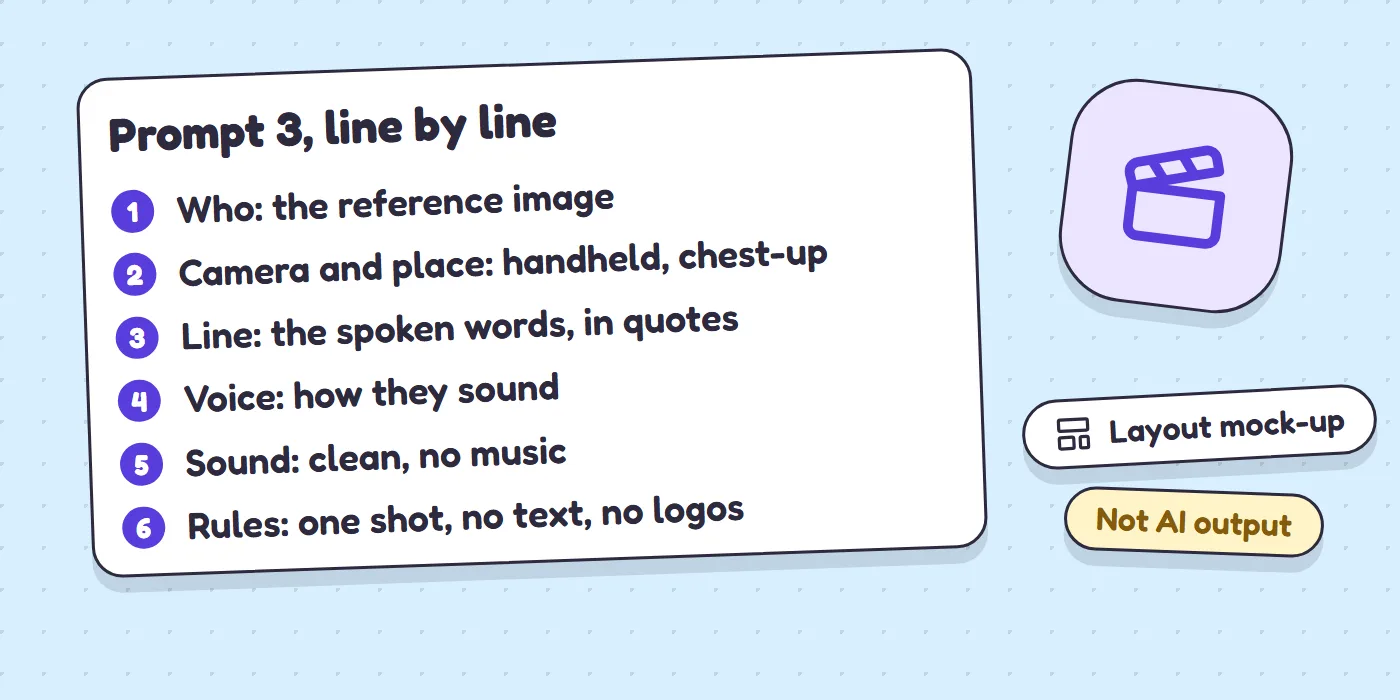
Adjust: with no reference image, replace the first line with the written look from Prompt 2. How a prompt points at a reference file differs per model, so use the form your tool documents. Works in: the four models in the table below.
Prompt 4: the caption and the disclosure line
Makes the post text, with one plain line saying the presenter is AI.
Write the post text for a [PLATFORM] video. The video is a [SECONDS] second talking video of a fictional AI presenter giving this tip: [THE TIP IN ONE SENTENCE].

Give me:
1. A caption of at most [CHARACTER LIMIT] characters in [LANGUAGE]. The first line is the hook. Plain words, no hype. Emojis: [yes or no].
2. One line that says the AI use in plain words, for example "The presenter in this video is AI-generated." Under 60 characters.
3. [NUMBER] hashtags that describe the topic. No hashtags about likes, follows or engagement.
4. For YouTube only: a title of at most 100 characters.

Do not claim personal experience or results, do not invent numbers and do not promise anything.
Adjust: run it once per platform with that platform's character limit. Works in: any capable chat assistant.
Prompt 5: the claims check
Lists every sentence that could cause trouble. It is a first filter, not a legal check.
Act as a careful editor for short social videos. Below are the script and the caption of a video spoken by a fictional AI presenter.

Check every sentence and list problems under these headings:
A. Personal experience: the presenter says or implies they used, bought or tried the product.
B. Results: any promised or implied result (money, weight, skin, time saved, followers) without a source I gave you.
C. Numbers and facts: any figure, date or statement a viewer could check, and whether I gave a source.
D. Sensitive topics: health, money, legal matters or children.
E. Anything that makes the presenter look like a real customer, employee or expert.

For each problem quote the sentence and suggest a rewrite that keeps the tip. If a heading has no problems, write "none found".

Script: [SCRIPT]
Caption: [CAPTION]
Sources I can show: [LINKS, OR "none"]
Adjust: add your own banned claims under a new heading F. Works in: any capable chat assistant.
Which AI video models can run the scene prompt? (Checked Against the Makers' Pages)
All four models below make a clip with sound from a text prompt, and they differ in length, in what you can feed them and in what their makers say they still get wrong. This is what each maker's own page said on 22 November 2026, in alphabetical order.
| Model | Longest clip | You can feed it | Sound | Limits and status the maker states |
|---|---|---|---|---|
| Kling 3.0 (Kling, post of 26 June 2026) | 15 seconds, any length from 3 to 15 | Text, or a starting image for consistent characters | Voices and sound effects made with the picture, in Chinese, English, Japanese, Korean and Spanish plus dialects | The post lists no limits. Kling's site already shows a newer version than 3.0 |
| Seedance 2.0 (ByteDance Seed, 12 February 2026) | 15 seconds, multi-shot | Text plus up to 9 images, 3 video clips and 3 audio clips | Two-channel audio with music, effects and character voiceovers | "Still far from perfect", with occasional audio distortion and room to improve in text accuracy and multi-subject consistency |
| Seedance 2.5 (ByteDance Seed, 31 July 2026) | 30 seconds in a single pass | Text plus up to 30 images, 10 video clips and 10 audio clips | Audio and picture generated together, "in sync" | Physical plausibility of complex motion, and stability when several subjects interact |
| Wan 3.0 (Alibaba, 7 August 2026) | 30 seconds per clip | Text, images, video, audio, web pages and documents | "Natural multilingual voice outputs" | Described as a beta you apply to test and as available in Alibaba's Token Plan; the post states no resolution |
Four things the table does not show. The makers' pages describe sound and picture made together, but in the parts we read none promises exact mouth movement, so check the mouth in every take. None lists Dutch as a speech language. None of the four posts states a resolution. And access differs: Kling runs on its own site, Seed's post says Seedance 2.5 was rolling out on Jimeng AI and Doubao Pro with API access "coming soon" on 31 July 2026, and Wan 3.0 is open to applicants on Alibaba Cloud Model Studio and Qwen Cloud. We did not read where Seedance 2.0 can be used outside the Studio below.
Our judgment for a 15-second clip is that any of the four reaches it, and that a 30-second clip needs Seedance 2.5 or Wan 3.0. Model pages change every few months, which is why each row carries its date.
What does a finished 15-second script look like? (An Example for a Fictional App)
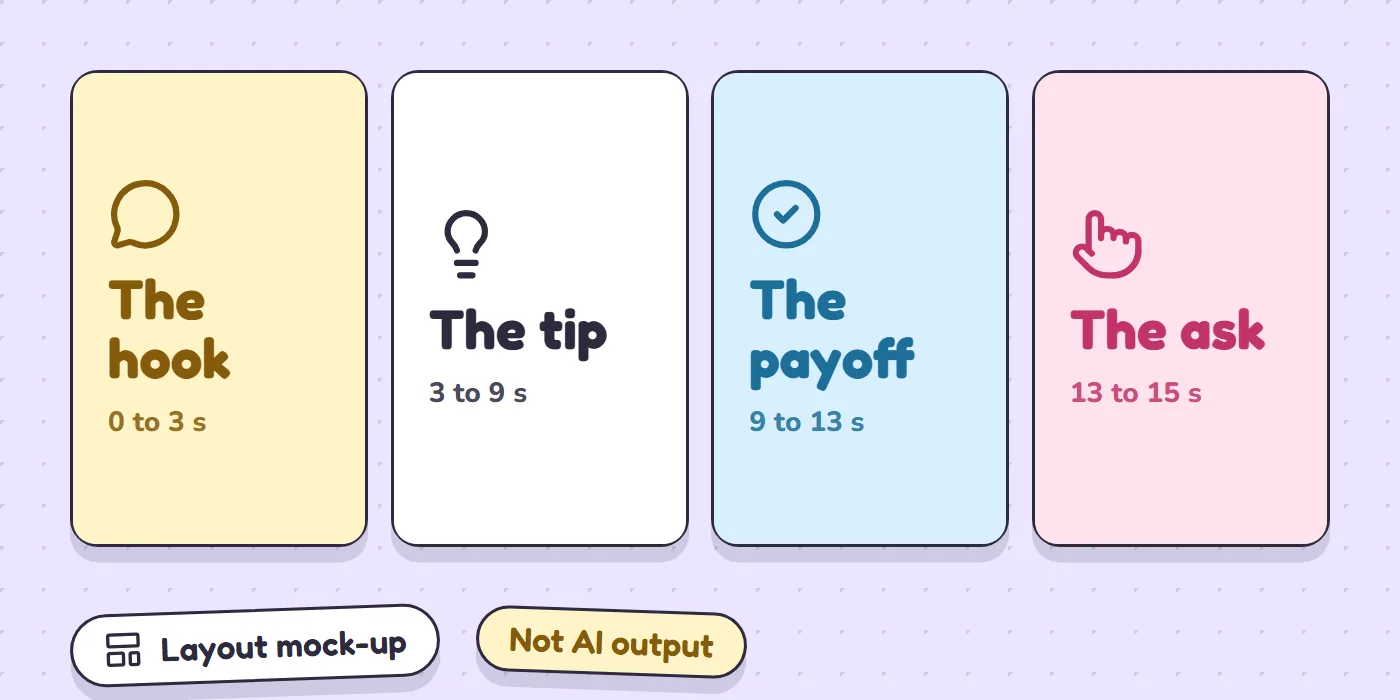
It looks like four beats, the short parts of a script, and about 38 spoken words. Here is example output for Nova Notes: an illustration we wrote by hand, not something a model produced for this post, and the app's behavior is invented.
| Beat | Seconds | The presenter says | Words |
|---|---|---|---|
| Hook | 0 to 3 | "Your notes app has a graveyard folder." | 7 |
| Tip | 3 to 9 | "Fix it once: tag every note the moment you write it. One word is enough." | 15 |
| Payoff | 9 to 13 | "Then clear the untagged list every Friday. That's the whole routine." | 11 |
| Ask | 13 to 15 | "Try it on today's notes." | 5 |
That is 38 words in 15 seconds, or 2.5 words a second, inside the pace from step 2. The on-screen caption for the post could read "Tag as you write. Clear on Fridays." and the post text "Tag notes as you write them, then clear the untagged list every Friday. The presenter in this video is AI-generated."
If your video must show the real app, record the real screen and cut to it. A model will invent a screen, and Seed's own post lists text accuracy among its open problems.
What should you check before you post?
Check six things, and make another take when any of them fails.
| Check | What to look for |
|---|---|
| The face | The same person all the way through, with sensible hands, glasses and teeth |
| The words | Every word of the script spoken, in order, and a mouth that moves with them |
| The voice | A voice that fits what you asked for, a steady volume and no crackle |
| Text and logos | None you did not put there |
| The place | Nothing odd in the background, no real brand marks, no extra people |
| The product | If a product or screen shows, it is the real one: record the real thing instead |
How do you make it in Postrooster Studio?
In Postrooster Studio you pick the Talking video template, say what it is about, choose a creator, a place and a voice, and press "Make it". The video lands in your Library, and you can send it into a post. This section describes the Studio as it works in the version we read on 22 November 2026, and the Studio page has the overview.
| Studio field | What you put there | Where it comes from |
|---|---|---|
| "What they say" | The spoken line | The script from Prompt 1 |
| "Scene" | A short description, ideally in English: the Studio says "In English, the models read that best" | The place and mood from Prompt 3 |
| "Post caption" | The post text | Prompt 4 |
| "Who is in it" | A ready-made creator, "Surprise me", or "New" to describe your own | Prompt 2 |
| "Where", "Voice", "Music" | A place, a voice ("Your own" is a description, not a clone) and music ("None" is the default for a talking video) | The place and voice lines of Prompt 3 |
- Open the Studio. Press "Studio" under "Creation" in the sidebar and stay on "Create". You can paste your website under "Paste your website. Get ideas made for you." for an editable brand kit, or skip it.
- Pick "Talking video". It is Portrait (9:16) with a default length of 10 seconds, so set "Length" to 15.
- Fill the fields in the table. Type a subject under "What is it about?" and press "Write an idea", or write your own idea in the fields.
- Choose who is in it. The ready-made groups are UGC girls, UGC guys, Everyday, Fitness, Gaming, Tech and Business. Every ready-made creator is AI-made, and none is a real customer. A creator made from your own photo needs the tick "This is me, or I have permission from this person": it carries a real person's likeness, so it needs that person's permission and the AI label.
- Pick the model. "Recommended" is Seedance 2.0 (up to 15 seconds), "Premium" is Seedance 2.5 (up to 30), and "Budget" covers Wan 3.0 (up to 30) and Kling 3.0 (up to 15), which does not show when a creator, a place or an added image is in play. The Studio runs a faster build of Seedance 2.0 than the one the launch post describes, at 720p, and it offers Kling 3.0, not the newer version.
- Press "Make it". A talking video takes about three to six minutes and lands under "Library". If a run fails, press "Try again" on its card. If a finished take is wrong, open the card's three-dot menu and press "Remix": it reopens the form with the same creator, voice, place, model, length and music, so you can change one thing.
- Check it, then use it. Run the checklist above, then press "Use in a post" for a draft with your caption, or press "From Studio" in the composer and pick the video under "Add from Studio". The post gets its own copy. The Studio never ticks the AI label for you: you tick it in the composer's TikTok and YouTube settings.
The Studio has no voice cloning, no library of real creators and no AI customer testimonials. A talking video has no captions burned in. The card has "Use in a post" and a menu with Rename, Remix, Download and Delete, so cutting a video or adding captions happens in another app. For a trending sound pick "None", download the video and add the sound in the TikTok or Instagram app.
Where does scheduling help?
Scheduling helps once the video exists: you write the week's posts in one sitting and they go out at the times you chose. Postrooster posts a video to TikTok, Instagram and YouTube from one composer, with its own caption per platform.
On Instagram one MP4 of 3 to 90 seconds goes out as a Reel, and Stories you post in the Instagram app yourself. The composer has an AI-label setting for TikTok and YouTube but none for Instagram, so a Reel that needs Instagram's "Add AI label" switch (see the table above) is better posted from the Instagram app. Postrooster's platform list shows what each connection posts.
Postrooster does not edit or cut video, label AI content for you, reply to comments or show views and results, so read those in each platform's own analytics. If you would rather post stills than a video, see TikTok photo post limits.